How to Plan Amazon A+ Content Modules
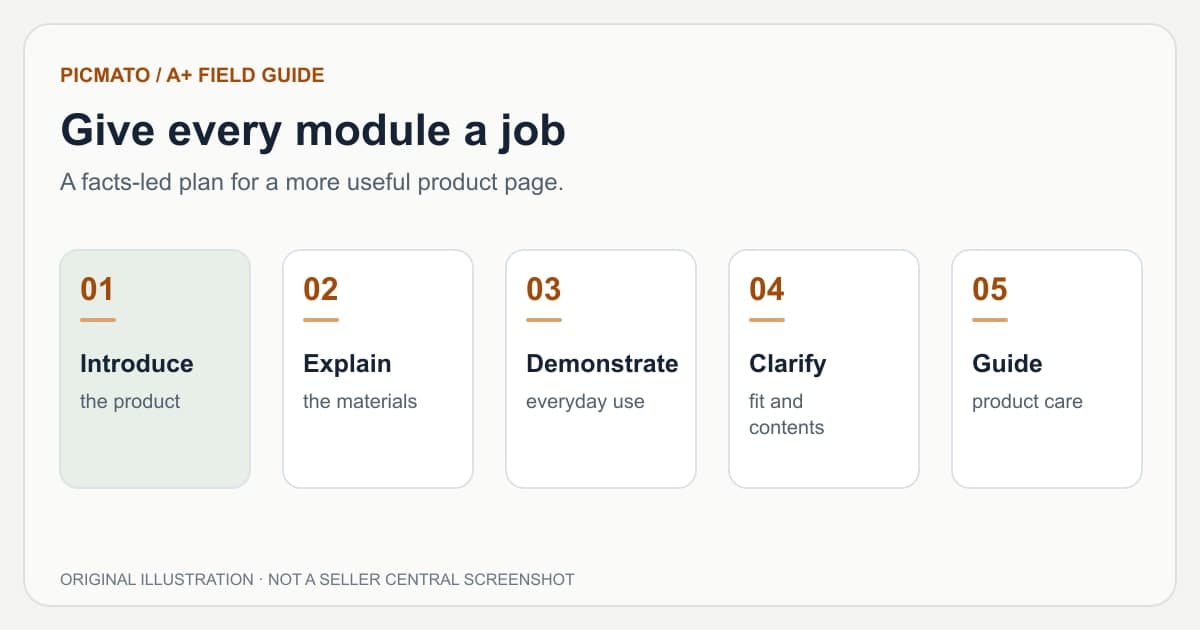
Original planning illustration. Module purposes are editorial examples, not mandatory Amazon module names.
Plan Amazon A+ content by assigning a specific shopper question to each module, then choosing the image or text format that answers it. Start with verified product facts. Arrange the page so that a reader can understand the offer, inspect the details, and resolve the remaining questions without reading the same benefit repeatedly.
The five-module example below is an illustrative brief for an unbranded insulated bottle. Its product facts are fictional and must be replaced with your own verified information. The sequence is a working design recommendation, not an Amazon rule or a claim about conversion performance.
What should an A+ content brief contain?#
A useful brief has three parts: what you can prove, what the shopper needs to know, and what each module will show. Keep the raw product facts separate from marketing wording. This makes it easier to spot a visual that accidentally adds an accessory, exaggerates capacity, or presents a claim with no supporting evidence.
Amazon's best-practice announcement encourages specific, helpful product information and images that actually show the product. Use that as the starting point. Design choices such as color, spacing, and headline length should help readers understand those facts rather than stand in for them.
- Product identity: model, variation, sold quantity, and package contents.
- Verified facts: dimensions, materials, compatibility, and care instructions.
- Shopper questions: fit, use, limitations, and differences between your models.
- Evidence: product photos, approved specifications, and substantiation for claims.
- Deliverables: intended Amazon modules, desktop/mobile assets, and image descriptions.
References: Amazon News: Improve your listings with A+ Content best practices
How do shopper questions become module ideas?#
Group questions by the decision they affect. A sizing question needs dimensions or a credible scale reference. An assembly question needs a sequence. A question about what arrives in the box needs a clear contents view. Repeating a slogan in each case leaves the actual objection unanswered.
Reviews and customer questions can reveal uncertainty, but a review is not proof that your product delivers a claimed result. Use the question to guide the explanation, then substantiate the answer from your own product information. Amazon's design guide specifically discusses using recurring questions to inform helpful Q&A content.
| Shopper question | Suitable explanation | Evidence needed |
|---|---|---|
| Will it fit? | Dimensions with a clear measurement reference | Verified measurements of the sold variant |
| How do I use it? | A short sequence or in-use scene | Actual instructions and appropriate use conditions |
| What is included? | Labeled contents view | Exact pack list and quantity |
| Which model should I choose? | A factual comparison within your range | Verified specifications for every compared item |
| How do I care for it? | A clear care instruction panel | Approved cleaning and maintenance instructions |
References: Amazon: How to create A+ Content, with design tips and examples
What could a five-module plan look like?#
For this fictional bottle, assume the approved facts sheet says 600 ml, stainless steel, one bottle with a screw lid, and hand wash only. No temperature-retention duration or leakproof certification has been supplied. The brief therefore avoids those claims, even if they would make an appealing headline.
Use the following sequence to test whether each module contributes new information. If the opening image already communicates an everyday use scene, the later module should demonstrate a different decision detail rather than repeating the same shot with another slogan.
| Module | Question and content | Avoid |
|---|---|---|
| 1. Product introduction | What is it? Show the bottle, its capacity, and its intended context. | An unverified 'best' or 'number one' badge |
| 2. Construction | What is it made of? Show the documented material and actual lid. | Inventing hidden layers or insulation performance |
| 3. Everyday use | How is it handled? Show the actual opening and carrying action. | An unsupported spill or drop demonstration |
| 4. Fit and contents | What arrives, and how big is it? Use verified measurements and pack contents. | Props that look like included accessories |
| 5. Care and limitations | How do I maintain it? State hand wash only and relevant instructions. | A dishwasher-safe icon that contradicts the facts sheet |
How do sections map to exported modules?#
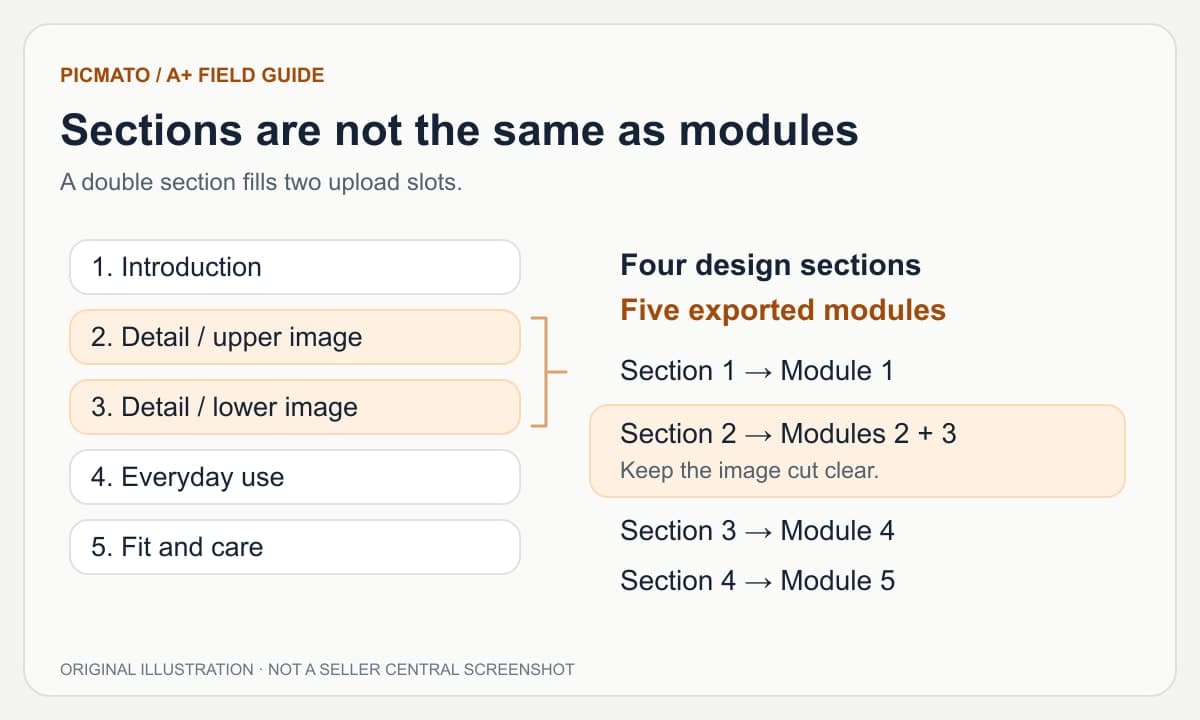
When using Picmato, plan both the message and the module budget. A single section takes one module; a double section takes two. A layout with four design sections can therefore fill five upload slots. Use a double only when the subject needs the additional area and can survive a module boundary.
The diagram shows the arithmetic, not a recommended Amazon module combination. A two-module design is still exported as separate images. Keep essential text and product details inside each image so Amazon's spacing between modules does not break a word or object.
When is a seven-module layout useful?#
Use extra space when you have distinct information worth showing: a setup process, separate use cases, detailed compatibility, or a material explanation that cannot be understood in one panel. Seven modules are not a reason to invent two more benefits or stretch five useful ideas into a longer page.
Amazon's design guide distinguishes up to five Basic modules from up to seven Premium modules. Picmato's five-module option still produces Premium-format image assets. Choosing a smaller Picmato layout does not convert it into Basic A+ content or change your Amazon access.
References: Amazon: How to create A+ Content, with design tips and examples; Amazon: A+ Content overview and access
How should the plan account for mobile and accessible text?#
Write a compact version of each message before designing. Decide what a reader must see first, which image detail makes the point, and which secondary copy can be removed. Plan a mobile arrangement for each section rather than assuming every desktop composition can simply be scaled down.
Amazon recommends limiting text embedded in images, using native module text fields, and writing descriptive image keywords. Where your chosen module provides native fields, use them for the information they can carry. Give each image an accurate description; do not use alt text as a place to repeat a list of unrelated search terms.
References: Amazon News: Improve your listings with A+ Content best practices
How do you know the brief is ready to generate?#
Read the plan from top to bottom without the artwork. Each section should answer a distinct question using facts you can point to. Mark anything unknown as a research task rather than letting a renderer make the decision for you.
- Every headline has a factual basis.
- Each module has a specific reader purpose.
- Single and double sections add up to the chosen module count.
- Desktop and mobile have the same intended message.
- The reference images show the right product, pack quantity, and variation.
- No comparison, certification, or performance claim has been invented.
- A teammate can explain the page's sequence without extra context.
Amazon guidance is linked beside relevant sections and in the references below. Practical design advice and illustrative examples are identified separately. Seller Central requirements and account access can change; review your current module editor before uploading.
Edited by Picmato.
Content reviewed: Nov 15, 2026
Frequently asked questions
How many A+ modules should I use?
Use enough modules to answer the important product questions clearly. Amazon's design guide describes up to five Basic modules and up to seven Premium modules. That is a platform limit, not a recommendation to fill every slot. Picmato offers five- and seven-module Premium-format layouts; choose based on the information you can substantiate and the module access you have.
Is an A+ section the same as an Amazon module?
In Picmato, a section is one part of the generated design. A single section fills one exported module, while a double fills two. The section count determines how many distinct design units you are working with; the module count determines how many image files occupy the upload slots. Check both when planning the layout and reviewing the app's cost quote.
Should A+ content repeat the product image gallery?
Some product identity should remain consistent, but a useful A+ page adds explanations the gallery could not fully cover. Show how a feature works, clarify compatibility, explain care, or answer a common question. Avoid repeating the same hero shot and slogan in multiple sections. Treat this as practical editorial guidance rather than a promise about sales performance.
Sources & Reference Documentation
Recommended Playbooks & Market Guides
Platform policies, image compliance documentation, and conversion frameworks.
Amazon A+ Content and Brand Story: A Practical Guide
Start here for the differences between Basic A+, Premium A+, and Brand Story, then follow the creation, planning, sizing, mobile, and troubleshooting guides.
How to Create Amazon A+ Content with Picmato
A practical walkthrough from an Amazon product and a module plan to reviewed desktop and mobile images, with a checklist for Seller Central upload.
Amazon A+ Content Design for Mobile
A wide banner rarely becomes a strong mobile composition by shrinking. Learn what to rearrange, what to simplify, and how to check the final Amazon preview.